Here's what we cover:
Instacart vs DoorDash for Drivers in 2026: Which Pays More?
How much do Instacart drivers make? What are the pros and cons of DoorDash? If you’ve been wondering about issues like these for Instacart vs. DoorDash, you’re not alone. Whether you’re starting your first driving gig, or considering a switch, knowing what these two popular services have to offer is crucial. In this blog post, we’ll cover the territory, including
Instacart vs. DoorDash: Main differences
The gig economy and the services it offers to consumers and workers are in a state of constant flux. There was a time when stark distinctions could be drawn regarding what the different companies required of drivers, but those days are behind us.
These two companies are a case in point. Instacart is, for the most part, a grocery delivery service, as you can read in this article from Millenial Money Man. There are options to deliver groceries only, shop and deliver groceries, or stay in a store and do the shopping and packing, preparing the items for a driver to deliver. Instacart is diversifying. Read about the company’s foray into prepared food delivery in this Gridwise blog post. You’ll find that the deliveries involve prepared foods found in grocery stores.
DoorDash is mainly a prepared food delivery service. You will most often be called to various restaurants to pick up meals and deliver them to customers. However, there will be times when you’ll be asked to go to stores and pick up items, pay for them with your DoorDash-issued red card, and take them to customers. Yes, that means Dashers may have to do some shopping. Read more about the DoorDash driving gig in this post from EntreCourier.
While the lines between the two companies are somewhat blurred, you’ll find that there’s less shopping when working for DoorDash than with Instacart. This Gridwise post gives you information on how to be a DoorDash delivery driver. Those who choose Instacart have the options that are more oriented toward shopping, but can possibly find gigs that don’t involve anything besides driving and delivery. Learn more about the details of driving for Instacart in this Gridwise blog post.
Now let’s look at each service and what they have to offer.
What you need to know about Instacart delivery driving
How much do Instacart shoppers make? What’s the job really like? How easy is it to earn money with Instacart? Is Instacart worth it?These are just some of the questions you might have about becoming a shopper/driver for this popular grocery delivery service. Here are some answers, plus an easy comparison table that lays out the good and bad points for you.
Instacart full-service shoppers, according to Gridwise data, make around $15–16 per hour. Instacart in-store shoppers, who are part-time employees of the company, make an average of $14 per hour. The total amount you make working for Instacart will depend, obviously, on how many hours you work for them, how many batches are available, and what times of day you decide to schedule your blocks, but it’s a hustle.
What do Instacart Shoppers do?
The job itself, as you might guess, will involve some or all facets of grocery shopping, packing, and/or delivery. You will need to be able to manage the weight of the packages. as well as carry them from the store to your vehicle. Then you’ll need to convey them to the customer’s delivery destination. You will also be asked to find everything on your customer’s list, and if you can’t find an item, you’ll consult with them about possible substitutes.
Instacart earnings
Instacart earnings are consistent, and don’t show signs of declining. People have adopted the habit of shopping online for their groceries with Instacart, and you’re quite likely to notice a steady flow of business at all times of the year. Shoppers average around $16.50 per trip before tips, which is really pretty solid.
Instacart driver tip rates
Tips are pretty good with Instacart, too. The average shopper received about $6.50 in tips per trip. A hidden bonus about getting tips is that it’s an area you can always work on. Get inspiration from this Gridwise post, which tells you how to make $1000 per week with Instacart.
Instacart requires some people skills
Shopping and driving for Instacart is a reliable gig, but it’s best for those who like to hustle, and do it with a smile. Many drivers switch to grocery delivery from rideshare, hoping to get a break from the demands of dealing with their passengers. Shopping for people, or even just driving and delivering, is a little bit less stressful, to be sure. There are situations, though, that can create some frustrations. Finicky customers, grumpy grocery store workers, and difficulties dealing with other drivers create the need to use your customer service skills and take traffic snarls and bad drivers in your stride.
The pros and considerations of Instacart delivery driving
Let’s look at what life as an Instacart shopper is like in a nutshell:
Instacart ProsInstacart ConsiderationsWork is consistent; hours are flexible.Pay can be lower in comparison.Ability to choose blocks of time to work.Requirement to work a minimum of two consecutive hours; scheduling is required ahead of time.Job offers variety.Potentially too many tasks associated with each order.Lots of short-lived contact with other humans, and possibilities for big tips!Challenging interactions can stem from contact with surly people in the store, traffic madness, and nasty customers.Company innovating with food delivery and nano-fulfillment.New company practices could create more demands on shoppers and drivers.Bonuses offered for high performance, sign-on and referrals; some extra pay for peak orders.Fee for instant cashout.Company constantly improving its app and method of payment. Recently increased minimum earnings per batch.Complicated (and not very transparent) payment algorithm.
What you need to know about Doordash delivery driving
DoorDash calls its delivery drivers “Dashers,” and for good reason. The job consists of getting requests for deliveries, traveling to food establishments (and sometimes stores) to retrieve them, and delivering them to the customers. The job is fairly simple and doesn’t require much work on the “supply side,” apart from when the shopping part kicks in.
The Dasher job does require customer service savvy and a bit of patience, as you’ll need to deal with occasional delays. Always communicate with your customers to keep them up to date on where you are and how long they might have to wait.
DoorDash is expanding its services to include delivery of convenience items, and this side of the business could continue to expand. Before long, shopping could be as much a part of a Dasher’s job as it is for Instacart workers, which can be exciting and rewarding for Dashers.
How much does Doordash pay?
Dasher gross hourly pay runs between $15 and $16, according to data collected by Gridwise. This includes the basic delivery fee, peak pay, challenges, and promotions for drivers. Your total earnings will depend, of course, on how many hours you drive for DoorDash, how busy you are during the time you’re delivering, and what bonuses might be in effect during your shift.
Because hourly pay for DoorDash can vary to such a great degree, it can be tricky to choose the best times to work.
How much does Doordash tip?
Tips are the norm rather than the exception for Dashers, averaging around $4.28 per trip. Because a Dasher could make as many as three or four trips per hour, that can add up, which is pretty decent. Dashers need to invest in equipment such as beverage carriers and thermal bags if they expect to keep their customers happy, and earn big tips.
What else should you know about Doordash?
Most Dashers love the flexibility DoorDash offers. It’s possible to schedule blocks of time in advance or to operate under “Dash Now,” which will let you pick up and deliver orders on demand, whenever you wish. Also, Dashers have the option of declining orders that don’t seem to be worth the trouble.
The DoorDash app does a good job of informing drivers where the most business is and incentivizes them to work in busier areas offering more pay per order. Although this isn’t the most glamorous or high-paying gig, DoorDash drivers who learn how to work the gig to their advantage can easily pull in enough money to make a good living.
The pros and considerations of DoorDash delivery driving
Just like we did for Instacart, let’s look at the pros and cons of DoorDash delivery driving at a glance.
The pros of being a DasherThe considerations of being a DasherFlexible hours; can choose whether to accept orders.Variable demand. Weekly pay; high fee for instant cash out.More focus on delivery and less on shopping means more trips per hour and potentially more money.Lots of driving from one place to the next could lead to higher gas costs and more vehicle wear and tear.The “thrill of the chase” can arise from knowing where to go and when to make the most money.Requires some hustle, particularly in areas that don’t have restaurants with big money orders.No passengers and only limited interaction with others.Waiting at restaurants and constantly communicating with customers, so they don’t get impatient or blame you for delays.Company diversifying with delivery of non-prepared food items.Possible need to learn the art of speedily shopping for convenience and grocery items.Bonuses and incentives for peak pay, challenges, and promotions.Comparatively low pay for a lot of intense, fast-paced work.Well-established, popular company.The popularity of DoorDash leads to competition with other Dashers for delivery business..
Instacart or DoorDash? Which is your better gig?
There’s no way to ignore the fact that Instacart pay and DoorDash earnings are less than stellar, but if you fit either of these gigs into your work schedule, you’ll have some solid sources of income. Choosing the gig that’s best for you involves being honest about what you’re willing to do, what your preferences are, and how much you need to work.
Both Instacart and DoorDash demand a lot from drivers. If you’re an Instacart full-service shopper, you’re guaranteed to be spending a lot of time navigating your way through grocery stores to select items. Working for DoorDash requires a lot more quick action, and much more running around from place to place.
For now, though, much of the difference between the two companies, and whether you might want to work with them, revolves around how much you like to shop. If you want a more leisurely but less income-intensive and part-time gig, Instacart would probably win out over DoorDash. If you want to make more money in less time and have the option of working exactly when you want, your best bet is to be a Dasher.
You can also try multi-apping
Before you make a decision, though, consider this third option. Multi-apping, as you’ll read in this Gridwise post, is the art of working more than one gig at a time, and it’s a growing trend among gig workers. You could Dash at peak meal times, and do Instacart in the evenings and on weekends, when most people like to place and receive their grocery orders. And, if you really want to mix it up, you could throw some rideshare driving into the mix!
There are so many options in today’s gig economy, but there’s one thing you’ll need no matter how you choose to cobble your gig together, Gridwise!
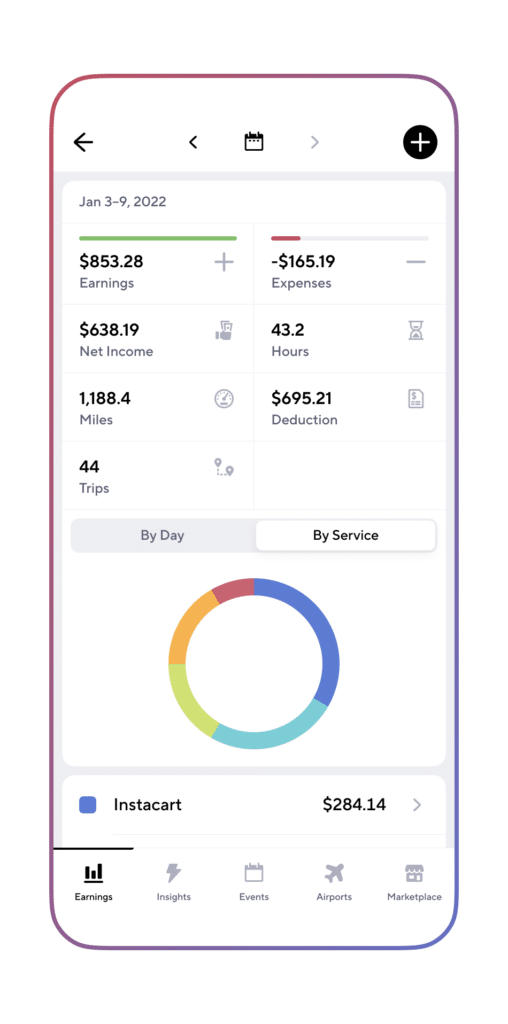
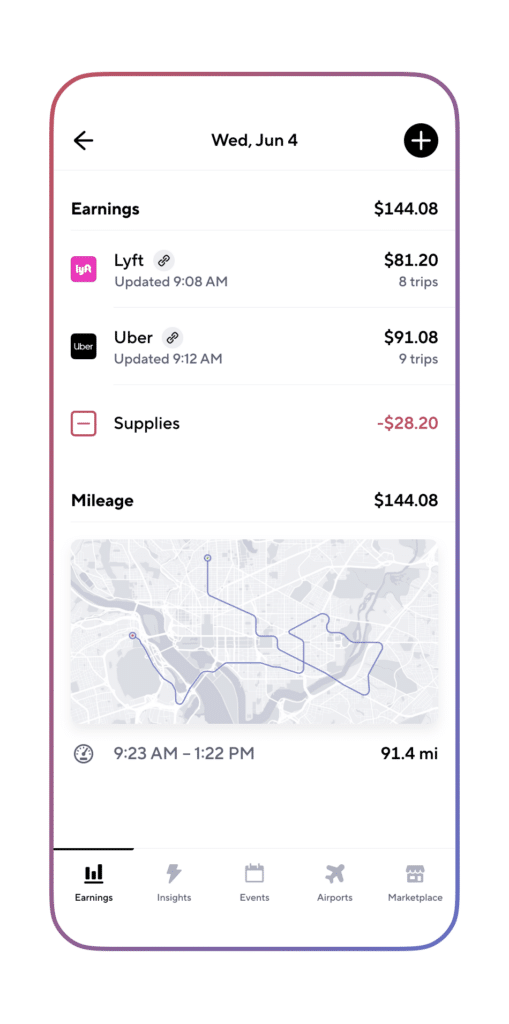
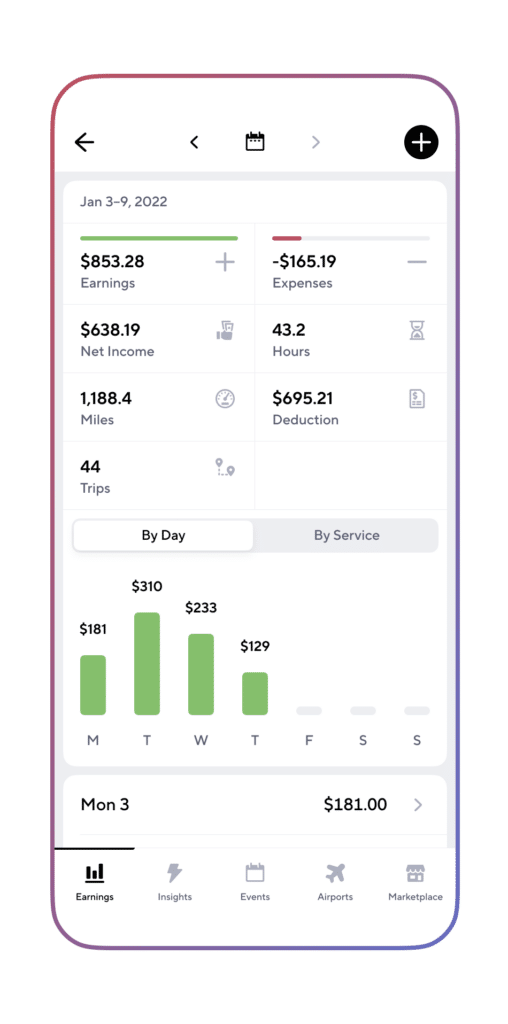
Gridwise gives you everything you need to put together a great driving gig, including
- a mileage tracker that accounts for every mile you drive on your gig
- traffic and weather alerts that keep you abreast of driving conditions
- seamless earnings tracker lets you sync and let Gridwise do the work
- expense recording to make sure you get all your deductions down
- informative graphs showing earnings and expenses for all the gig apps you use to see where you’re making them most money
- insight into when to drive and where to drive so you can make the most of your gig driving time
- access to affordable insurance to keep you covered
- deals and discounts for drivers, such as the cost-savings of Gridwise Gas
- a community of like-minded gig workers who supply pro tips and support
Find out more about Instacart, DoorDash, and Gridwise in these articles from the Gridwise blog:
Share article:
Related posts

Uber vs Lyft Driver Pay: Real Earnings in 2026
Two drivers can work the same roads on the same Saturday night, one on Uber and one on Lyft, and go home with paychecks that look nothing alike. Ask which app pays more in any driver forum and you will get a hundred confident answers, most of them based on one good night or one bad week.
Drivers ask whether Uber or Lyft pays more expecting a big number. Nationally, the difference per active hour is $1.43. On a four hour shift that works out to about $5.70.
The weekly numbers look nothing like that. Uber drivers average $522 a week. Lyft drivers average $325. That is a $197 difference, and a $1.43 hourly rate cannot produce it.
The reason for that difference is also the reason the answer changes from city to city.
In this post:
- What Uber and Lyft pay per active hour
- Where the weekly difference comes from
- Why the answer changes depending on your market
- How ride type controls affect which trips you see
- How tips, bonuses, and per mile pay compare
- How to test both apps on your own numbers
An active Uber Black and XL driver working Jacksonville, with driving history in Miami and Atlanta, walks through his own receipts against the Gridwise platform data.
Uber vs Lyft Driver Pay Is Nearly Identical Per Active Hour
Gridwise earnings data from a network of more than 500,000 drivers and couriers puts Lyft at $22.45 gross per active work hour and Uber at $23.88 in 2026. Active time means the clock is running on a trip. Passenger in the car, or on the way to pick one up.
Measured that way, both platforms pay in the same range. If Uber and Lyft each hand you a 30 minute ride, the two receipts will look similar. That is why a single screenshot proves almost nothing about which app pays better.
The word doing the work in that number is active. It excludes everything that happens between trips. Whether the next request came in 30 seconds after drop off or 45 minutes later, the active hour rate reads the same.
Active hour pay measures the trips you got. It says nothing about how many you got.
Where Uber or Lyft Pays More Comes Down to Trip Volume
The weekly averages fill in what the hourly rate leaves out. Lyft drivers log 14.7 active work hours a week. Uber drivers log 21.2.
Uber drivers get 6.5 more hours of paid trip time a week, likely from a similar number of hours online. At roughly $23 an hour, those extra hours account for about $150 of the $197 weekly difference. The hourly rate itself explains far less of it.
So the weekly difference is mostly about how many trips you get. More requests mean less time parked waiting for one, and waiting time is unpaid on both apps.
Rider pricing is part of why the volume differs. The average Uber trip costs a rider $24.32. On Lyft it is $21.02, about 14% cheaper. Cheaper fares do not automatically produce more ride requests, though. Some riders compare both apps and pick the lower price. Plenty of others open Uber because Uber is the app they have.
What is each app paying you? Link both your Uber and Lyft accounts in Gridwise and it syncs the earnings from each while tracking your miles automatically, so you can compare both apps over a full week instead of one shift. Track it free
Whether Uber or Lyft Pays More Depends on Your Market
National averages describe the country. They do not describe your city, and the difference between the two can be larger than $1.43 an hour.
In Jacksonville, one driver running both apps gets more requests through Uber. Lyft sends offers, but a large share of them are Extra Comfort fares that do not clear his cost of operating a premium vehicle. The Black and XL trips that do clear it come through Uber, and Uber reservations show up in his feed throughout the day while Lyft reservations are uncommon.
In Atlanta and Miami, the same driver saw the reverse. Lyft was busier. It paid comparably to Uber and sometimes better, because more riders in those markets were opening Lyft first. More Lyft riders mean more Lyft requests, more surge windows, and a better chance that a good trip appears when he needs one.
Neither app performs the same way in every city, and the stronger one in your market this year may not be next year. If you are weighing Lyft specifically, our breakdown of how much Lyft drivers make in 2026 goes deeper on the Lyft side of these numbers.
Ride Type Controls Decide Which Trips You See
Which trips reach you depends partly on a setting most pay comparisons ignore.
In Jacksonville, Lyft offers three ride type choices for a premium vehicle: all ride types, Black only, or premium only. Premium only groups Lyft XL, Extra Comfort, and Black together. A driver who wants XL requests sees Extra Comfort offers in the same feed and declines the ones that do not pay enough.
Uber in the same market splits those controls apart. Black and XL can be switched on while Uber X and Comfort stay off.
In a standard sedan, that difference barely registers. It matters in a premium vehicle, where fuel, tires, and maintenance cost more per mile. Declining offers is free, but it costs time, and time spent sorting offers is time not spent on a paid trip.
These controls are also market dependent. In Atlanta, the same driver had more individual control over ride types on Lyft than he does in Jacksonville. Uber's controls vary by city too. Your market also decides how precisely you can filter for the work you want.
Tips Favor Uber and Per Mile Pay Favors Lyft
Across the rest of the numbers, neither app sweeps.
Tips run higher on Uber: about $2.97 per work hour against $2.12 on Lyft, roughly 40% more. On premium rides specifically, tipping behavior is similar on either app. What differs is how many premium rides you get offered, which loops back to demand in your market.
Bonuses are structured differently on each app. Lyft leans on percentage based bonuses that stay available for a set window. Uber uses fixed dollar surge that moves faster with demand, which means it can appear and disappear before you reach it. A longer window on a small percentage may add less to a fare than a short lived fixed dollar surge on a short trip. Neither structure wins every time, and a promotion on the map pays nothing until a request comes through.
Per work mile, Lyft edges ahead at $1.01 against Uber's $0.94. On longer trips that adds up. It also does not help if the requests are too thin to fill the shift, which is how Uber ends up paying more per week despite the lower per mile rate.
Pick Your Primary App on Your Own Numbers
There is no national winner. What matters is how much work each app can send you where you drive.
The way to find out is to run several comparable shifts on each app and track six things: total online time, active time, gross earnings, work miles, tips and bonuses, and time spent waiting between requests. Waiting time is the one most drivers skip, and in most markets it is where the weekly difference shows up. Tracking all six by hand across two apps is where most drivers give up, which is the part Gridwise automates. Link both platforms in Gridwise and your earnings sync from each while it logs the miles automatically, so you get active hours, gross pay, and per mile pay broken out by app across a full week. That is what tells you which of the two is actually paying you better in your market right now.
Once you know, run the stronger app as your primary and keep the other one on as a backup for slow stretches. Then test again when demand shifts.
Keep Reading
- UberX vs Uber Comfort vs Uber Black: Earnings, Requirements, and Which Tier Is Worth It
- How Much Do Uber Drivers Make in 2026? (Data from 500k+ Drivers)
- How Much Do Lyft Drivers Make in 2026? (Real Data from 500k+ Drivers)
See which app is paying you more this week. Download Gridwise free and track your earnings, miles, and waiting time across Uber and Lyft in one place.
How Much Do Uber Eats Drivers Make in 2026? (Data from 500k+ Drivers)
How much do Uber Eats drivers make? Forums and recycled blog posts say "$10 to $25 an hour." This guide uses actual 2025 earnings from 101,709 Uber Eats drivers tracked through Gridwise, part of a network of more than 500,000 gig workers, plus the platform-by-platform numbers from our Annual Gig Mobility Report.
The median Uber Eats driver makes $14.07 per hour in total trip pay, including tips. Tips are $6.26 of that. On averages instead of medians, Uber Eats drivers grossed $18.06 per hour in 2025, up from $17.87 in 2024.
Uber Eats also has a low barrier to entry. You can deliver with a car, bike, or scooter, and on foot in some markets. Uber rideshare requires a qualifying vehicle.
This guide covers hourly pay, per-delivery earnings, tip income, the best times to deliver, and how Uber Eats compares to DoorDash, Grubhub, and Uber rideshare.
Quick answer: how much do Uber Eats drivers make per hour?
Uber Eats drivers earn a median of $14.07 per hour in total trip pay, based on 2025 data from 101,709 drivers tracked through Gridwise. Median means half of drivers earn more than $14.07 and half earn less. Add promotions and bonuses and the median gross pay is $15.03 per hour.
The top 25% of drivers earn $17.02 or more per hour. The top 10% earn $20.83 or more. All of these numbers are before gas, insurance, and vehicle costs.
Per delivery, the median driver earns $8.16 and completes 1.70 deliveries per hour. DoorDash drivers complete 1.51 per hour. More deliveries per hour is one reason Uber Eats drivers earn more per hour than DoorDash drivers.
Tips are a large part of Uber Eats pay. The median tip is $3.73 per delivery, which is 46% of the $8.16 median per-delivery total. Details below.
Uber Eats earnings breakdown
Here are the 2025 Gridwise numbers.
Hourly earnings
Total trip pay per work hour (base fare, surge, and tips combined):
- Median driver: $14.07/hr
- Top 25%: $17.02/hr
- Top 10%: $20.83/hr
Gross pay per work hour adds promotions and quest bonuses. The median is $15.03 per hour. That extra $0.96 per hour is $29 more over a 30-hour week, and it comes from drivers who hit quest targets and consecutive-delivery bonuses.
Per-delivery earnings
The median Uber Eats delivery pays $8.16 in total trip pay. The top 10% of drivers average $12.00 per delivery.
The range between a median delivery and a top-10% delivery is under $4. Rideshare trips vary far more: a single trip can pay $4 or $30. Uber Eats pay per delivery is more consistent, so you rarely get a big payout and you rarely get stuck with a very low one.
Deliveries per hour
Uber Eats drivers complete a median of 1.70 deliveries per hour. DoorDash drivers complete 1.51. That is 13% more deliveries per hour on Uber Eats, and more deliveries per hour means more pay per hour. The top 10% of Uber Eats drivers complete 2.28 deliveries per hour.
Want to know exactly what you make per hour, per delivery, and in tips? Download Gridwise free and track your real Uber Eats earnings automatically.
How Uber Eats pay works
Delivery pay has several parts, and it works differently from rideshare pay. Knowing the parts helps you decide which orders to take and when to log on.
Base pay
Every delivery includes a base pay amount. Uber sets it using estimated time, distance to the restaurant and then to the customer, and how desirable the order is. Uber does not publish the formula. Rideshare fares are mostly distance and time.
Base pay for a typical delivery is $2 to $8 before tips, depending on distance and complexity. Stacked orders (two restaurants or two customers on one trip) pay more per batch but less per individual delivery.
Trip supplement
Uber adds a trip supplement when nearby drivers are not accepting an order. If an order has been declined several times or involves a long drive, Uber raises the payout. If you decline a low offer, the same order may come back later at a higher price.
Surge and boost zones
During high-demand periods, Uber turns on surge pricing or boost zones for deliveries. Surge adds a multiplier or flat bonus to base pay. Boost zones are scheduled promotions shown in the app, for example "1.3x pay downtown between 6pm and 9pm." They are announced in advance, so you can plan shifts around them.
Promotions and quest bonuses
Uber offers these bonus incentives to delivery drivers:
- Quests: complete a set number of deliveries in a window (for example, 30 deliveries Friday through Sunday) for a flat bonus
- Consecutive delivery bonuses: extra pay for completing a streak of deliveries without declining
- Boost zones: scheduled multipliers in specific areas and time windows
- Sign-up and referral bonuses for new drivers
These promotions are the difference between total trip pay ($14.07/hr median) and gross pay ($15.03/hr median) in our data.
Uber's service fee
Uber takes a service fee on every delivery. It varies by market and order type, typically 15% to 30% of the delivery fee before tips. Uber does not take a cut of tips. 100% of customer tips go to you. Every earnings figure in this article is what drivers receive after Uber's fee.
How much do Uber Eats drivers make in tips?
Tips are a bigger share of pay on Uber Eats than on rideshare or most other gig platforms.
Tip earnings per delivery
- Median driver: $3.73 per delivery
- Top 10%: $6.20 per delivery
Tip earnings per hour
- Median driver: $6.26/hr
- Top 10%: $11.09/hr
The median Uber Eats driver earns $6.26 per hour in tips. The median Uber rideshare driver earns $2.08 per hour in tips. The top 10% of Uber Eats drivers earn over $11 per hour in tips.
Why tips are so high on Uber Eats
The median tip of $3.73 is 46% of the $8.16 median per-delivery pay. On Uber rideshare, tips are 6% to 7% of trip pay. Four reasons for the difference:
Customers tip at checkout, before the food arrives, and the app suggests preset amounts. Restaurant delivery has a long-standing tipping norm that rideshare never fully picked up. Order totals are often higher than a short rideshare fare, so percentage-based tip suggestions are higher too. And the customer usually sees you at their door, which keeps the tip personal.
How to maximize your Uber Eats tips
Tips are nearly half of per-delivery pay, so small changes add up. Deliver during dinner and weekend windows, when order values and tips are both higher. Skip low upfront offers from far-away pickups; the tip is usually included in the offer, so a low offer means a low tip. Keep food upright and sealed, follow the customer's drop-off notes, and send a short message when you pick up and when you arrive. Customers can change tips after delivery, and drivers who communicate are the ones who see tips go up.
Best times to deliver Uber Eats (earnings by day and time)
Gridwise tracks delivery earnings across all major platforms by day of week and time block. Here is what average gross earnings per hour look like for delivery drivers.
Dinner rush dominates (6pm to 8pm)
The highest-earning window is 6pm to 8pm. That holds every day of the week and is strongest on weekends.
Sunday 6pm to 8pm is the single best block at $18.28 per hour on average, 29% higher than the lowest weekday blocks. If you can only deliver during one window, make it Sunday evening.
Afternoon rush (3pm to 5pm)
3pm to 5pm is the second-best block on most days. Early dinner orders and snack deliveries pick up, and fewer drivers are online than at 6pm, so wait times between offers are shorter.
Late night pays well (12am to 5am)
Late-night and early-morning hours pay above average. The 3am to 5am window averages $16 to $17 per hour on most days, and midnight to 2am beats midday hours.
Fewer drivers are online late, so base pay runs higher, and late-night customers tip well. Most drivers skip this window.
Avoid midweek midday
The lowest-earning times are Tuesday through Thursday from 9am to 2pm, at $14 to $14.50 per hour.
The best block pays over $4 per hour more than the worst. Over a 20-hour week, that is $365 versus $285: $80 more per week, or more than $4,000 a year, from picking the right shifts. For more on timing, see the best times to drive for Uber Eats.
Want to find the highest-paying hours in your own market? Download Gridwise free and see the best times to deliver based on real earnings data.
How to earn more on Uber Eats
The median Uber Eats driver earns $14.07 per hour. The top 10% earn $20.83. That is a $6.76 per hour difference, and it comes down to which orders you take, where you wait, and when you work.
The video below profiles how a handful of experienced Uber Eats drivers approach the job, from which orders they skip to when they log on.
The sections below walk through each of those habits, starting with how top earners decide which orders to take.
Benchmark against the best
If you are at the median ($14.07 per hour, 1.70 deliveries per hour), the next target is the top 25% at $17.02 per hour. The top 10% earn $20.83 per hour, complete 2.28 deliveries per hour, and make $11.09 per hour in tips. Track your own numbers for two weeks and see which of those three you are furthest from. That tells you whether to work on order selection, positioning, or timing.
Multi-app to fill dead time
The fastest way to raise your hourly rate is to run multiple delivery apps at once. When Uber Eats is slow, DoorDash or Grubhub may have orders waiting. The key rules for multi-apping:
- Only accept one active order at a time unless the pickups and drop-offs are on the same route
- Pause the other apps as soon as you accept an order, so you are not declining offers and hurting your standing on the other platform
- Compare offers on pay per mile and pay per minute, not the headline dollar amount
- Keep completion rates high on every app; a cancellation costs more than a declined offer
- Track earnings across apps in one place so you know which one pays best in your market and hours
Position near restaurant clusters
Wait near dense restaurant areas such as shopping centers, downtown strips, and food courts, not residential neighborhoods. Closer to restaurants means faster pickups and more offers per hour. The top 10% of drivers complete 2.28 deliveries per hour versus the median 1.70, and much of that comes from positioning.
Be strategic about order acceptance
Not every Uber Eats order is worth taking. Experienced drivers judge each offer on dollars per mile (many use $1.50 to $2.00 per mile as a floor), total time including the restaurant wait, whether the drop-off keeps them in a busy zone, and whether the tip is already included in the upfront amount.
You can decline any order. Your acceptance rate does not affect your standing on Uber Eats the way it can on other platforms. Take the orders that pay, skip the ones that don't. Also track your deductible expenses; our guide to tax deductions for gig workers covers what counts.
Running Uber Eats alongside DoorDash or Grubhub? Download Gridwise free and track earnings across every app in one place, so you know which one pays best and when.
Uber Eats vs Uber rideshare vs DoorDash
Here is how Uber Eats compares to DoorDash and Uber rideshare using Gridwise data.
Uber Eats vs DoorDash
Uber Eats pays more per hour than DoorDash on every measure we track.
On medians, Uber Eats drivers earn $14.07 per hour in trip pay versus $11.26 on DoorDash, 25% more. Uber Eats drivers also complete more deliveries per hour (1.70 vs 1.51).
The 2025 averages from our Annual Gig Mobility Report show the same pattern:
- Average earnings per hour: Uber Eats $18.06, DoorDash $12.43
- Average earnings per mile: Uber Eats $1.27, DoorDash $0.94
- Average weekly gross: Uber Eats $198, DoorDash $247
- Average weekly hours: Uber Eats 11.5, DoorDash 18.8
DoorDash drivers gross more per week because they work about seven more hours. Per hour and per mile, Uber Eats pays more. For the full comparison, see Uber Eats vs DoorDash pay in 2026. Grubhub is the closest competitor on hourly pay at $18.67 average; see Grubhub vs Uber Eats pay.
Uber Eats vs Uber rideshare
Rideshare pays more per hour. The median Uber rideshare driver earns $21.18 per hour in trip pay versus $14.07 for Uber Eats. On 2025 averages, Uber rideshare drivers grossed $23.88 per hour and $522 per week over 21.2 hours. Uber Eats drivers grossed $18.06 per hour and $198 per week over 11.5 hours.
Per mile, Uber Eats pays more: $1.27 versus $0.94 on rideshare. Delivery trips are shorter, so you put fewer miles on your car for each dollar earned. Rideshare also requires a newer qualifying vehicle, passengers in your car, and usually higher insurance costs. For the rideshare numbers, see how much Uber drivers make.
When each platform makes sense
Uber Eats fits drivers who want part-time work, use a bike, scooter, or older car, and do not want passengers. The average Uber Eats driver works 11.5 hours a week. Most people use it as a supplement, not a full-time job.
Uber rideshare fits drivers with a qualifying vehicle who want the highest hourly rate and will work longer shifts at peak times.
DoorDash fits markets where Uber Eats demand is thin, and it works as the second app in a multi-app setup. Many drivers run both delivery apps and take whichever offer pays more.
Is Uber Eats worth it in 2026?
Yes, for the right driver. Uber Eats pays more per hour than DoorDash, about the same as Grubhub, and is one of the easiest gig platforms to start on.
The case for Uber Eats: average hourly earnings rose to $18.06 in 2025, average weekly gross rose 12.8% to $198, and you can start with almost any vehicle. Tips are a large, steady share of income. Your acceptance rate does not put your account at risk, so you can be selective.
The downsides: the median driver earns $14.07 per hour before gas and vehicle costs, and per-mile pay fell 2.6% year over year to $1.27. Uber does not publish the base pay formula. Nearly half of per-delivery income is tips, so a bad tipping night is a bad night. Weekly earnings are modest because most Uber Eats drivers work short weeks. If you need $500 or more a week, you will need to combine Uber Eats with another app or work the peak windows hard.
Uber Eats is best for part-time earners who want a flexible schedule, drivers without a rideshare-eligible vehicle, night owls who can work 12am to 5am, and multi-appers who want a second delivery platform with strong hourly pay.
Uber Eats driver pay FAQ
Can you make $1,000 a week doing Uber Eats?
At the median $14.07 per hour, you need about 71 hours a week to hit $1,000. At the top 25% level ($17.02/hr) it drops to about 59 hours, and at the top 10% ($20.83/hr) to about 48 hours. It is possible but takes long weeks and peak-hour focus. A realistic target for a full-time driver working 40 hours is $560 to $830 a week, depending on skill and market. See how to make $1,000 a week with Uber Eats for the strategy.
Does Uber Eats pay more than DoorDash?
Yes. The median Uber Eats driver earns $14.07 per hour versus $11.26 on DoorDash, 25% more. On 2025 averages it is $18.06 versus $12.43. Uber Eats drivers also complete more deliveries per hour (1.70 vs 1.51). See how much DoorDash drivers make for the DoorDash breakdown.
How much do Uber Eats drivers make in tips?
The median Uber Eats driver earns $3.73 per delivery in tips, or $6.26 per hour. The top 10% earn $6.20 per delivery and $11.09 per hour. Tips are 46% of per-delivery pay on Uber Eats, compared with 6% to 7% on Uber rideshare. See how much Uber Eats drivers make before tips.
Is Uber Eats better than driving Uber?
Uber rideshare pays more per hour ($21.18 median vs $14.07) but requires a newer qualifying vehicle and passengers. Uber Eats has lower vehicle requirements, lower vehicle costs, better pay per mile ($1.27 vs $0.94), and no passengers. Many drivers do both and take whichever offer pays more.
What is the best time to deliver Uber Eats?
6pm to 8pm, especially on weekends. Sunday 6pm to 8pm pays the most at $18.28 per hour on average. Late night (12am to 5am) pays $15 to $17 per hour. The lowest-paying times are Tuesday through Thursday from 9am to 2pm at $14 to $14.50 per hour. Peak hours pay over $4 per hour more than slow times.
How much do Uber Eats drivers make per week?
The average Uber Eats driver grossed $198 per week in 2025, up 12.8% from $175 in 2024, working an average of 11.5 hours. At the median hourly rate, 30 hours a week is roughly $420 to $450 before expenses.
Start tracking your Uber Eats earnings today
Uber Eats pays a median $14.07 per hour in trip pay and an average $18.06 per hour in 2025, well ahead of DoorDash. Tips are $3.73 per delivery, nearly half of per-delivery income, and $6.26 per hour. The top 10% of drivers earn $20.83 per hour by working peak windows, waiting near restaurant clusters, and declining low offers.
The way to move from the median to the top 25% is to know your own numbers: what you earn per hour, per delivery, and in tips, by day and time. Then change the one that is furthest behind.
Want to see how your Uber Eats earnings compare to 101,709 other drivers? Download Gridwise free and track your earnings, find the best times to deliver in your market, and see where you stand.
How to Become an Uber Driver in 2026: Requirements, Sign-Up, and What to Expect
Signing up to drive for Uber or deliver with Uber Eats is one of the fastest ways to start earning money on your own schedule. Whether you want to give rides, deliver food, or do both, the application process is straightforward, but there are specific requirements and steps you need to know about before you begin.
This guide walks you through the entire process from start to finish, covering both Uber rideshare and Uber Eats. We will explain what you need to qualify, how to submit your application, how long approval takes, what it costs to get started, and what to expect during your first week on the road. If you are looking for a detailed breakdown of vehicle and driver requirements specifically, check out our complete guide on Uber driver requirements before you apply.
Quick Answer — How to Sign Up for Uber in 5 Steps
Here is the short version of how to become an Uber driver or Uber Eats driver in 2026:
- Download the Uber Driver app from the App Store or Google Play
- Enter your personal information including your name, email, phone number, and Social Security number
- Upload your required documents: driver's license, vehicle registration, insurance, and a profile photo
- Consent to a background check run by Checkr (takes 3-10 business days)
- Complete a vehicle inspection (rideshare drivers only, $20-$50 depending on your market)
Estimated total time from application to first trip: 7 to 14 days.
Most of that waiting period is the background check. The actual application itself takes about 15 to 20 minutes to complete. The rest of this guide breaks down each step in detail and covers everything else you need to know, including how Uber Eats sign-up differs from rideshare.
Uber Driver vs. Uber Eats Driver — What's the Difference?
Before you sign up, it helps to understand the difference between driving for Uber (rideshare) and delivering for Uber Eats. They use the same app and the same sign-up process, but the requirements, earning potential, and day-to-day experience are different.
Uber Rideshare (UberX, Comfort, XL, etc.):
- You transport passengers from point A to point B
- Stricter vehicle requirements (4-door, must be 16 years old or newer, no cosmetic damage)
- Must be 21 or older in most markets (25 in some)
- Higher earning potential per trip
- Requires a vehicle inspection before you can start
Uber Eats (Delivery):
- You pick up food orders from restaurants and deliver them to customers
- More flexible vehicle options, you can deliver by car, bike, scooter, or even on foot in some markets
- Lower age requirement (18+ in most markets)
- No vehicle age requirement for delivery-only drivers
- No vehicle inspection required
- Lower barrier to entry overall, but tips make up a larger portion of your income
Can you do both? Yes. When you sign up through the Uber Driver app, you can choose to enable both rideshare and delivery. Once approved, you can toggle between them at any time depending on what is available and what you feel like doing. Many drivers stack Uber Eats deliveries during slow rideshare periods to keep their earnings consistent.
Which Should You Choose?
If your main goal is to maximize earnings per hour, rideshare generally pays more on a per-trip basis, especially during surge pricing. However, it requires more investment upfront (a qualifying vehicle, inspection, and insurance) and means having strangers in your car.
If you want the lowest barrier to entry and maximum flexibility, Uber Eats is the way to go. You can start with almost any vehicle, or no vehicle at all in some cities, and work at your own pace without interacting with passengers. Many drivers start with Uber Eats while they figure out whether they want to commit to rideshare.
If you are on the fence, sign up for both. There is no downside to having both options available, and you can always adjust later based on what works best in your market.
Requirements to Drive for Uber (Rideshare)
To drive for Uber's rideshare service, you need to meet requirements for both yourself and your vehicle. Here is a summary of the key qualifications, for a full deep dive, see our complete Uber driver requirements guide.
Driver requirements:
- Be at least 21 years old (some markets require 25)
- Hold a valid U.S. driver's license, you must have had it for at least one year (three years if you are under 25)
- Have a clean driving record with no major violations in the past seven years
- Pass a background check through Checkr
- Have a valid Social Security number
Vehicle requirements:
- Four-door vehicle
- Must be model year 2010 or newer (varies by city, some markets require 2012 or newer)
- No salvage or rebuilt title
- No significant cosmetic damage
- Must pass a vehicle inspection
- Must be registered and insured in your name (or you must be listed on the policy)
Insurance requirements:
- Must carry at least your state's minimum auto insurance coverage
- A rideshare endorsement or commercial policy is strongly recommended, though not always required by Uber
- Uber provides supplemental liability coverage while you are online and on trips, but it does not cover your vehicle's damage, that gap is where a rideshare endorsement matters
The specific requirements can vary by city and state, so always check Uber's website for your local market. Some cities have additional requirements like a TLC license (New York City) or specific permits.
Requirements to Deliver for Uber Eats
The requirements for Uber Eats delivery are notably less strict than rideshare:
- Age: 18 or older (compared to 21 for rideshare)
- License: Valid driver's license if delivering by car. If delivering by bike, scooter, or on foot, no driver's license is needed, just a government-issued ID
- Vehicle: Car, bike, electric bike, scooter, or on foot (availability varies by market)
- No vehicle age requirement for delivery-only sign-ups
- No vehicle inspection required for delivery drivers
- Background check: Still required, same process as rideshare
- Insurance: Required if delivering by car (same as rideshare), not required for bike or foot delivery
This lower barrier to entry is a big reason why "how to become an Uber Eats driver" is one of the most searched gig economy phrases. If you meet the basic age and background check requirements, you can likely start delivering within a week or two.
Step-by-Step Sign-Up Process
Now let's walk through the actual application process. Whether you are signing up for Uber rideshare, Uber Eats, or both, the process starts the same way.
Step 1 — Download the Uber Driver App
Search for "Uber Driver" in the Apple App Store or Google Play Store. Make sure you download the Uber Driver app, not the regular Uber rider app, they are two separate applications. The Uber Driver app has a green icon, while the rider app has a black icon.
You can also start your application online at uber.com/drive, but you will eventually need the app to complete the process and to actually accept trips once you are approved.
Step 2 — Enter Your Personal Information
Once you open the app, you will be prompted to create a driver account. You will need to provide:
- Your full legal name (must match your driver's license exactly)
- Email address
- Phone number (Uber will send a verification code)
- Social Security number (for the background check)
- Your city or market area
If you already have an Uber rider account, you can use the same email to sign up as a driver. The system will link both accounts.
At this stage, you will also choose whether you want to drive (rideshare), deliver (Uber Eats), or both. You can change this later, so if you are unsure, select both to keep your options open.
Step 3 — Upload Required Documents
This is where the process takes the most hands-on effort. You will need to upload clear photos of:
- Driver's license (front and back)
- Vehicle registration (if driving a car)
- Proof of insurance (if driving a car)
- Profile photo: a clear, front-facing photo of your face with no sunglasses or hats
Tips for getting your documents accepted on the first try:
- Take photos in good lighting with no glare or shadows
- Make sure all four corners of each document are visible in the frame
- Ensure text is legible and not blurry, hold your phone steady
- Your profile photo should be taken against a plain background with your face clearly visible
- Make sure your name matches across all documents exactly (middle name, suffixes, etc.)
- Do not crop or edit the photos before uploading
Document review typically takes one to three business days. If something is rejected, Uber will notify you in the app with a specific reason, and you can re-upload immediately. The most common rejection reasons are blurry photos, glare obscuring text, and name mismatches between documents.
Step 4 — Consent to Background Check
After your documents are submitted, Uber will prompt you to consent to a background check through Checkr, their third-party screening provider. This is a required step for both rideshare drivers and Uber Eats delivery partners.
What Uber checks:
- Criminal history (county, state, and federal records going back seven years)
- Sex offender registry
- Motor vehicle records (driving violations, suspensions, DUIs)
- SSN verification and identity confirmation
Typical timeline: 3 to 10 business days, with most applicants cleared within five business days.
You do not need to do anything during this waiting period, it runs automatically after you provide consent. You can check your status at any time in the Uber Driver app under the "Account" section.
For a complete breakdown of what the background check covers, what disqualifies you, and what to do if there is a problem, read our detailed guide on the Uber background check.
Step 5 — Complete Vehicle Inspection (Rideshare Only)
If you are signing up to drive rideshare passengers, your vehicle must pass an inspection before you can go online. Uber Eats delivery drivers can skip this step entirely.
Where to get your inspection:
- Uber-authorized inspection stations (search in the Uber Driver app for locations near you)
- Some mechanics and auto shops that are Uber-approved
- Certain Uber Greenlight Hub locations (available in larger markets)
What they check:
- Working headlights, taillights, and turn signals
- Tire condition and tread depth
- Brakes
- Seatbelts for all passenger seats
- Working horn and windshield wipers
- No significant body damage or mechanical issues
- Interior cleanliness and condition
Cost: Typically $20 to $50, depending on your market and where you go. Some markets offer free inspections at Greenlight Hubs. You pay out of pocket, Uber does not reimburse this cost.
The inspection form must be uploaded to the Uber Driver app. Once it is reviewed and approved (usually within one to two business days), you are cleared to start accepting rides.
Download Gridwise alongside the Uber Driver app to track your earnings, find peak hours, and maximize your income from day one.
How Long Does It Take to Get Approved?
From the moment you submit your application to the moment you can accept your first trip, expect the process to take 5 to 14 days in most cases.
Here is how that breaks down:
- Application and document upload: 15-20 minutes
- Document review: 1-3 business days
- Background check: 3-10 business days (runs in parallel with document review in many cases)
- Vehicle inspection review: 1-2 business days (rideshare only)
For Uber Eats delivery drivers who are not using a car, the timeline is often shorter since there is no vehicle inspection or insurance verification step. Some Uber Eats applicants are approved in as little as three to five days.
What can delay your approval:
- Blurry or rejected documents (adds 2-4 days while you re-upload)
- Background check holds, if Checkr needs to verify records across multiple counties, it can take longer
- Name mismatches between your license, registration, and insurance
- Expired documents (insurance or registration)
- High application volume in your market during peak sign-up periods
What to do while you wait:
- Use the time to set up your car (phone mount, charger, dashcam)
- Research your local market to understand peak hours and busy areas
- Read through Uber's driver policies and community guidelines
- Download Gridwise and start exploring earnings data and peak hours in your area so you are ready to hit the ground running
What If You're Denied or Waitlisted?
Not every application gets approved. Here is what you need to know if you run into issues.
Common denial reasons:
- Felony conviction within the past seven years
- DUI or major driving offense on your record
- Too many moving violations
- Suspended or revoked license
- Vehicle does not meet requirements
- Failed vehicle inspection
How to appeal through Checkr:
If your denial is based on your background check, you have the right to dispute the results directly with Checkr. Checkr will send you a copy of the report, and you can file a dispute if you believe any information is inaccurate. The dispute process typically takes 30 days.
You can start a dispute at Checkr's candidate portal (candidate.checkr.com). You will need the report ID from the email Checkr sent you.
Waitlisted, what it means:
In some markets, Uber places new applicants on a waitlist when they have enough drivers in the area. This does not mean you were denied, it means your market is temporarily saturated. Waitlists can last anywhere from a few weeks to several months. There is no way to speed up the process, but you will be notified by email and in the app when a spot opens.
If you are waitlisted for rideshare, you may still be able to start with Uber Eats in the meantime, since delivery has separate capacity limits.
How Much Does It Cost to Become an Uber Driver?
Signing up for Uber is free, there is no application fee. However, there are real costs associated with getting started, and it helps to know what you are getting into financially.
Startup cost breakdown:
- Vehicle inspection fee: $20-$50 (rideshare only; free at some Greenlight Hubs)
- Insurance upgrade (rideshare endorsement): $0-$50/month extra depending on your provider and state
- Phone mount: $10-$25
- Car phone charger: $10-$20
- Dashcam (optional but recommended): $50-$150
- First tank of gas: $40-$70
- Car wash and interior cleaning: $10-$30
Estimated total to get started: $50 to $300, depending on your market and what you already own.
If you are signing up for Uber Eats delivery only (especially by bike or on foot), your startup costs are essentially zero beyond what you already have.
What Uber provides vs. what you need:
- Uber provides the app, navigation, payment processing, and supplemental insurance while you are on a trip
- Uber does not provide a vehicle, phone, phone mount, dashcam, or personal auto insurance
- Uber does not reimburse gas, maintenance, or any startup costs
One thing to keep in mind: all of these expenses, plus your gas and car maintenance costs, are tax-deductible as business expenses since you are an independent contractor. Keep your receipts from day one.
What to Expect Your First Week
Getting approved is just the beginning. Your first week driving for Uber or delivering for Uber Eats will involve a learning curve, and knowing what to expect will help you avoid common mistakes and start earning faster.
Navigating the app for the first time:
The Uber Driver app can feel overwhelming at first. Before you go online, spend 10 to 15 minutes exploring the interface. Familiarize yourself with how to go online and offline, how to view and accept trip requests, where to find your earnings summary, and how to contact rider or customer support.
Choosing your first rides or deliveries:
For your first few trips, stick to areas you know well so you are not relying entirely on GPS navigation. This reduces stress and lets you focus on the pickup and drop-off process. If you are doing rideshare, shorter trips close to home are a good way to get comfortable before tackling airport runs or long highway trips.
Understanding surge pricing and promotions:
Uber uses dynamic pricing (called "surge") that increases fares when demand is high, think Friday and Saturday nights, morning rush hour, or during bad weather. The app shows you a heat map of surge areas in real time.
As a new driver, you may also qualify for sign-up bonuses or guaranteed earnings promotions. These vary by market and change frequently, but they can be worth hundreds of dollars if you hit the required trip count within the specified timeframe. Check the "Promotions" tab in the Uber Driver app to see what is available in your area.
Setting realistic earnings expectations:
Your first week will probably not be your highest-earning week. You are still learning the best times to drive, the most profitable areas, and how the app works. Most new Uber drivers earn between $15 and $30 per hour before expenses during their first week, depending on their market. For a detailed look at what you can expect to make, check out our guide on how much Uber drivers make.
Do not compare your earnings to what full-time veteran drivers post online. They have optimized their strategy over months or years. Focus on learning the patterns in your market during week one.
First-Week Tips from Experienced Drivers
Here are tips that experienced Uber drivers wish they had known during their first week:
- Drive during peak hours first. Friday and Saturday evenings (7 PM to 2 AM) and weekday morning rush (6 AM to 9 AM) are consistently the busiest and highest-paying times in most markets. Start there.
- Keep your car clean and stocked. For rideshare, a clean car with a phone charger available for riders goes a long way toward better ratings and tips.
- Do not chase surge. By the time you drive to a surge area, it often disappears. Instead, position yourself near bars, restaurants, or event venues where you know demand will spike.
- Accept most trips your first week. Your acceptance rate matters less than you think long-term, but early on, every trip is a learning opportunity. Get your first 20 to 30 trips under your belt before you start being selective.
- Track everything from day one. Your mileage, gas receipts, car washes, and any other driving-related expenses are all tax-deductible. Start a tracking system now so you are not scrambling at tax time.
- Download Gridwise alongside the Uber Driver app. Gridwise shows you real-time earnings data, peak demand times, and airport queue information for your specific market. Having that data from your first day gives you an advantage most new drivers do not have.
How to Maximize Your Earnings from Day One
Use Gridwise to find peak hours in your market. Gridwise aggregates earnings data from thousands of drivers in your area and shows you exactly when and where demand is highest. Instead of guessing, you can plan your shifts around proven peak windows. This alone can increase your hourly earnings by 20% or more compared to driving at random times.
Stack Uber Eats with rideshare during slow periods. If you are approved for both, toggle on Uber Eats delivery during times when rideshare requests slow down (typically mid-afternoon on weekdays). This keeps you earning instead of sitting idle.
Take advantage of new driver promotions and bonuses. Uber frequently offers sign-up bonuses, guaranteed earnings, and quest promotions for new drivers. These can range from $100 to $1,000+ depending on your market. Check the Promotions tab in the Uber Driver app and make sure you understand the requirements (usually a specific number of trips within a set timeframe). For a full breakdown of current promotions, see our guide on Uber driver bonuses.
Learn your market's patterns. Every city is different. In some markets, airport rides are the money maker. In others, it is bar close on weekends. Pay attention to where your best fares come from during your first two weeks, and build your schedule around those patterns.
Download Gridwise alongside the Uber Driver app to track your earnings, find peak hours, and maximize your income from day one.
FAQ
Can I drive for Uber and Lyft at the same time?
Yes. There is nothing preventing you from being active on both platforms simultaneously. Many drivers toggle between Uber and Lyft (and even Uber Eats and DoorDash) to maximize their trip volume and reduce downtime. Just make sure you only accept one trip at a time and that you are not double-booking rides.
Do I need a special license to drive for Uber?
In most U.S. cities, no. A standard driver's license is all you need. However, some cities have additional licensing requirements. New York City, for example, requires a TLC (Taxi and Limousine Commission) license. Check Uber's requirements page for your specific city.
Can I drive Uber with a rental car?
Yes, but only through Uber's approved rental partners. You cannot use a personal rental from Enterprise or Hertz. Uber partners with companies like Avis and Hertz through specific programs designed for rideshare drivers. These rentals typically cost $200 to $350 per week and include insurance.
How old do you have to be to drive for Uber Eats?
You must be at least 18 years old to deliver for Uber Eats. This is lower than the 21-year minimum for Uber rideshare. If you are between 18 and 20, Uber Eats delivery is your only option on the Uber platform.
Do I need my own car to deliver for Uber Eats?
No. Depending on your market, you can deliver using a bicycle, electric bike, scooter, or even on foot. Car delivery is available everywhere, but alternative modes of transportation are only available in select cities, usually larger urban markets. Check the Uber Eats section of the Uber Driver app during sign-up to see which options are available in your area.
Can I sign up for both Uber and Uber Eats at the same time?
Yes, and this is actually what Uber recommends. During the sign-up process in the Uber Driver app, you can select both rideshare and delivery. You will go through one application and one background check. Once approved, you can switch between driving passengers and delivering food at any time from within the app. There is no extra fee or separate application for adding Uber Eats to your driver account.
Curious how much you will actually make? Download Gridwise to see real-time demand in your market so you can plan your first week strategically.
Work smarter. Earn more.
Whether you drive, deliver, or pick up shifts — Gridwise helps you track earnings, mileage, and performance so you stay in control of your work. Download the app and take charge today.
